An invitation that makes guests fall in love with your day
For a wedding, birthday, milestone or company party: a page with the schedule, a map and an RSVP form instead of a plain image in a message. Guests reply right on it, and the reply lands straight in your list.
$29to publish · building is free
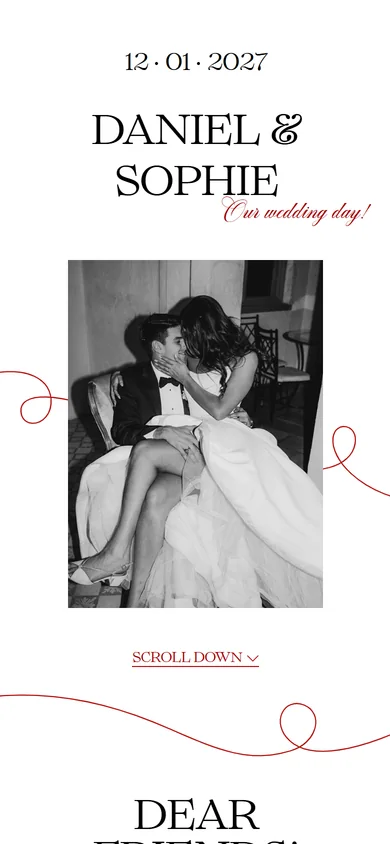
The date is set, the invitation is not
Send a short announcement first: names, date and countdown — in the same design as the invitation to come. Guests need time to free up the day, book time off and buy tickets, while you take your time with the venue and the programme.
When the invitation is ready you flip one switch: the link stays the same, and there is nothing to resend.
One link for both versions
- 6 months outSave the Datelive for guestsNames, date, countdown
- 2 weeks outInvitationVenue, schedule, dress code, RSVP
You switch in Publishing, with a single toggle. Nothing to resend — the address stays the same.
Designs
Chronicle
Editorial layout: high-contrast serif with handwritten accents, a three-day calendar and dress code galleries
Cover Story
Your wedding as a fashion magazine cover: a full-screen photo of the two of you, your names as the masthead and editorial spreads inside
Love Letter
A love letter to your guests: a large black-and-white photo, fine serif type, handwritten lines and a red signature
Film
A wedding on 35mm: a contact sheet with sprocket holes, the couple's frames and the date circled in red grease pencil
Trattoria
An Italian wedding lunch: a striped awning, lemons and the day's schedule as a menu written in blue ink
Herbarium
Your story as a botanical collection: pressed stems, museum labels and specimen numbers
Tenor
Calm classic: high-contrast serif, a full month calendar and three looks in each dress code gallery
Moment
Full-screen video on the cover, large handwritten typography and a calendar with the full date
Modern
Light paper texture, polaroid photos on the cover, a marked calendar and soft typography
Classic
Wide-spaced capitals, handwritten accents, full-width photos and an hour-by-hour schedule
Poster
A birthday like a gig poster: a huge age number, bold colour and a scrolling line-up
Gala
A milestone birthday as an evening hall: deep dark ground, gold lines and a large milestone number — festive and calm
Pass
A company party like a conference: a delegate badge on the cover, an hour-by-hour agenda and one bright colour
Disco
A birthday as a night party: a mirror ball, silver and one bright colour
Winter Ball
An end-of-year party: deep pine, red and snow, festive typography
Class of
Graduation: a squared notebook, ink, handwritten lines and a certificate stamp
Balloons
A kids' birthday: big shapes, primary colours, balloons and a fun schedule
Annual Report
A company day as an annual report: the year in numbers, big figures, a strict grid and one signal colour
Summer Day
An outdoor summer party: a picnic blanket, sun, grass and a schedule of games and music
Premiere
An awards night as a film premiere: red carpet, velvet, marquee lights and a schedule like credits
Route
A team-building trip: a topographic map, contour lines and a schedule as checkpoints
How it works
Choose a design
Each design sets the typography, palette and sections. Preview any of them — after that, you can edit everything except the design itself.
Edit right on the page
Tap any text and start typing. Tap a photo and choose your own. No side forms, no "roughly like this" previews.
Send guests the link
seatory.app/your-names opens on any phone with no app to install. RSVPs arrive in your account.
What's inside
Turn any section off with one tap — your invitation can be as short as you like.
RSVPs are collected right here
No spreadsheets or group chats: guests reply right on the invitation and you see the list in your account.
Set an RSVP deadline and the form closes after that date, letting guests know. Replies come in only after publishing — before that, only you and anyone you share the draft link with can see it.
One-time, per invitation. Opens your page to guests at seatory.app/your-names and turns on RSVPs in your account. Edits after publishing are free and unlimited.
Start for freeFAQ
What is a Save the Date, and what does it cost?
A short announcement: names, date and countdown in the same design as the invitation. You send it months ahead so guests can free up the date, book time off and buy tickets. It costs nothing extra — it's part of publishing: when the invitation is ready you flip a switch and the same link opens the full version.
Do guests need to install anything?
No. The invitation opens from a regular link in any phone or computer browser — just like a website.
Can I build it on my phone?
Yes. The editor works just as well on a phone: full-screen preview with settings in a bottom sheet.
What can guests see before I publish?
Nothing — only you, and anyone you send the draft link to, can see the draft. The guest link goes live once you publish.
Can I change the text after sending it?
Yes, anytime. The link stays the same and guests see the updated invitation the next time they open it.
How do RSVPs come in?
They're collected in your account: name, attending or not, plus-one, meal preferences and a note.
Build it and see
Pay only if you love the result.